Complex tournaments made easy. Simple tournaments maybe even easier. Member/guest invitationals, recurring leagues, Ryder Cup events — professional-grade management for golf pros, league organizers, and power tournament directors.
Free 90-day trial for PGA professionals. Contact us.
Managing a 16-week league in Excel is brutal. Tracking cumulative team standings across multiple formats is error-prone and eats up hours every week.
Emailing results to 30+ players. Texting tee times. Printing scorecards. It's a second job you didn't sign up for. Duck Hook Pro handles the busywork.
Golf Genius charges $1,000+/year and is overly complex for most needs. You need professional power without the enterprise price tag.
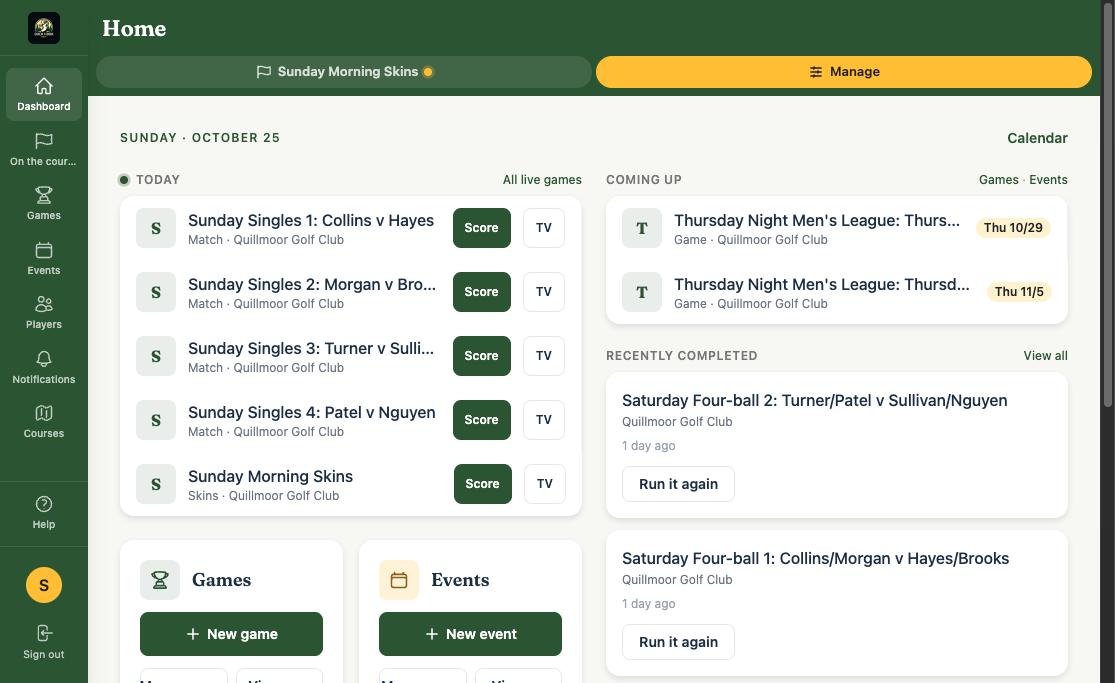
Duck Hook Pro is built for a pro with ten other things to do. It opens on what's being played and what needs you, and nothing else.
Today's games and league rounds lead the dashboard, each one tap from score entry and its clubhouse TV board. What's coming up in the next two weeks sits beside them.
Games nobody ended, golfers without a handicap, teams that aren't complete, scorecards ready to review. A ten-week league with one missing handicap is one line, not ten.
Games are sorted into Today, Coming up, Needs ending and Past, so tonight's round is never buried under a season of league weeks. A new game starts from last week's in one tap.
Enter each player's handicap index and Duck Hook Pro handles the rest. No manual stroke math before the round.
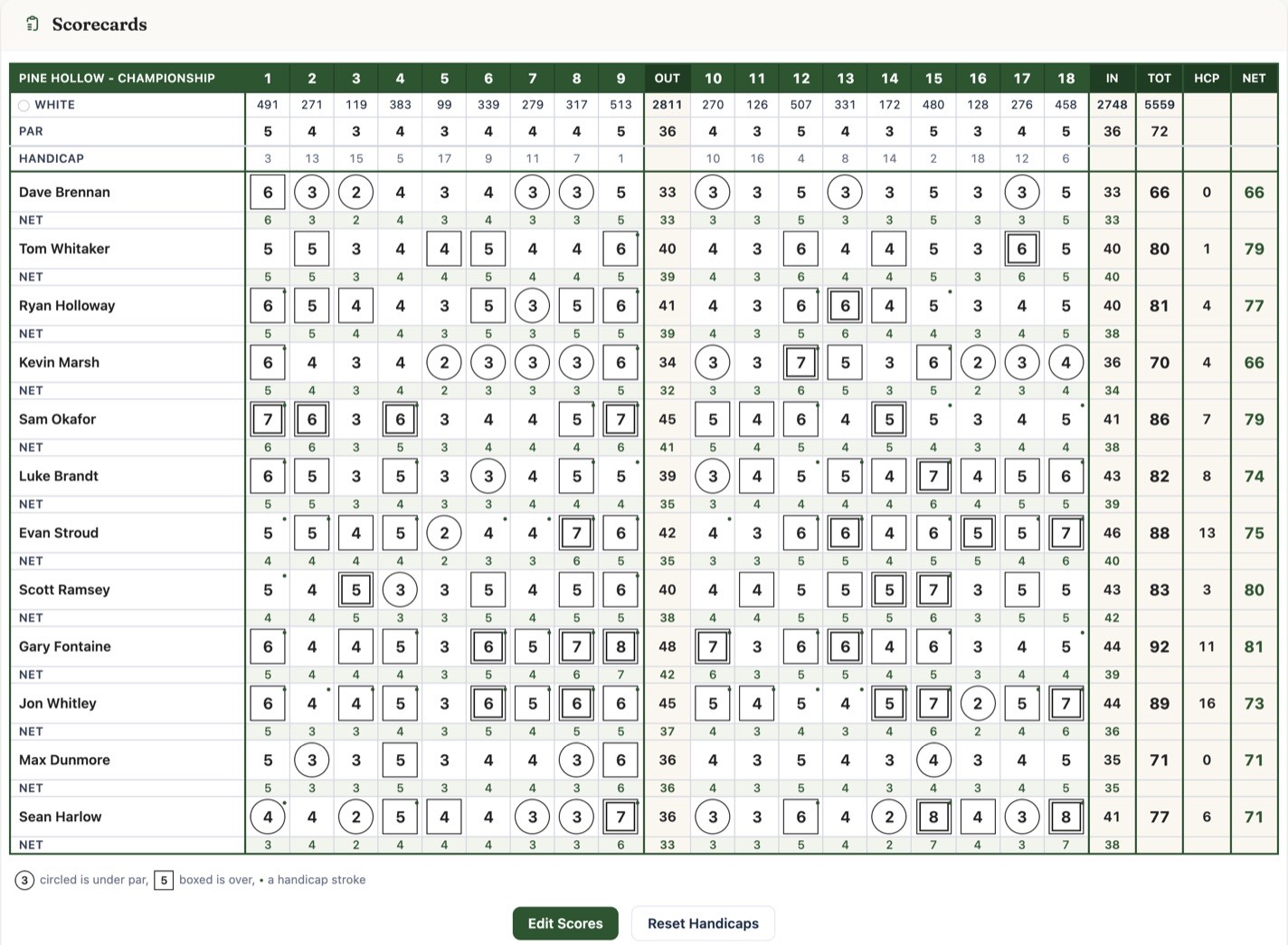
The scorecard reads like the one in your pro shop. Yardages, par and handicap across the top, Out and In subtotals, scores circled under par and boxed over, a dot in the corner where a golfer gets a stroke, and the net score under every hole.
Pick how strokes are given, game by game:
Set a handicap allowance (90%, 85%, whatever your game uses) and an event-wide cap when you need one.
Change where pops fall. The default stroke distribution follows the course's stroke index, but you can manually reassign any player's pop to a different hole — useful for split-tee formats or when the index doesn't reflect how the course actually plays for your group.
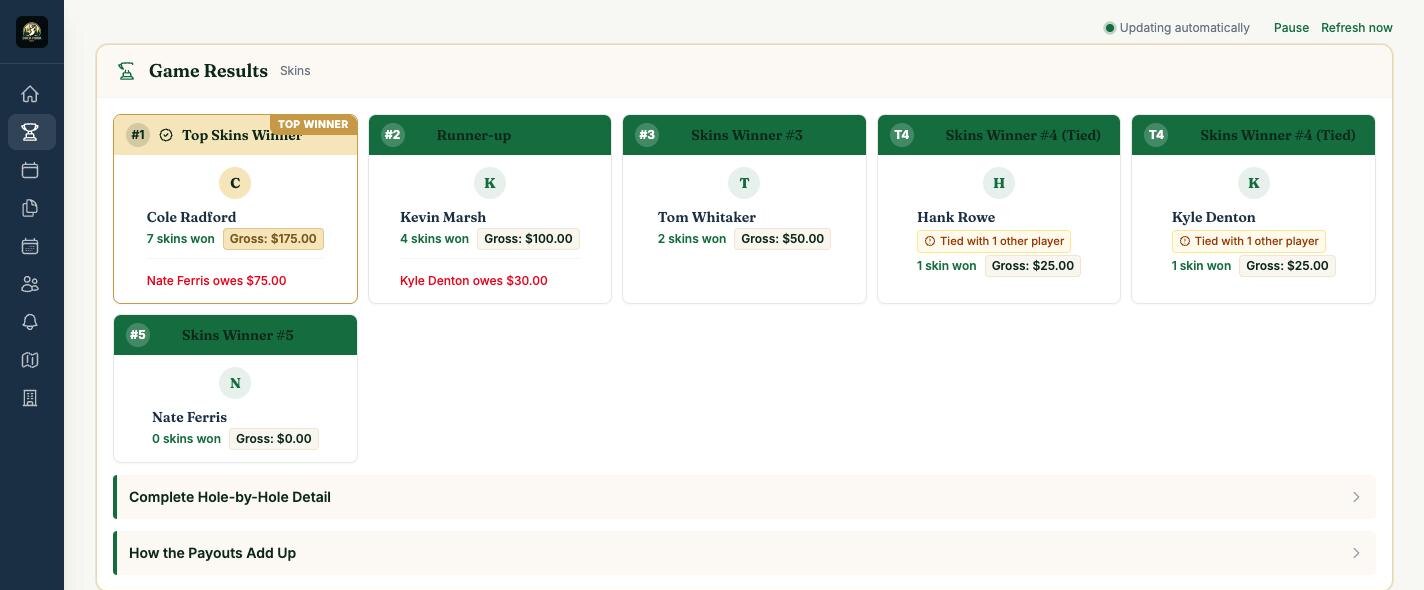
The game page updates on its own as scores come in, with a Pause button when you want it to hold still. Duck Hook Pro supports 43 formats — Skins, Nassau, Vegas, Best Ball, Scramble, Match Play, Quota, Stableford, Tilt, and more, including 11 that only Pro can set up, such as Rabbit, Sixes, Acey Deucey, Yellow Ball, Best Balls and a three- or four-person Team Scramble — and shows the right results for each: skins won, match status, points, or places. Golfers score Best Balls and Team Scramble in the free app once you’ve built the teams.
Payouts are worked out for you. Play for a set amount per skin, point, or hole, or run a pool with a fixed buy-in. The game page lists who owes whom, with Venmo links.
Built for a tablet too. Behind the counter or in the cart, the game and event pages fill a tablet screen: results, the scorecard and the hole-by-hole card across the page, with the golfers beside side bets and standings.
Your golfers follow the same live leaderboard in the free Duck Hook Golf app.
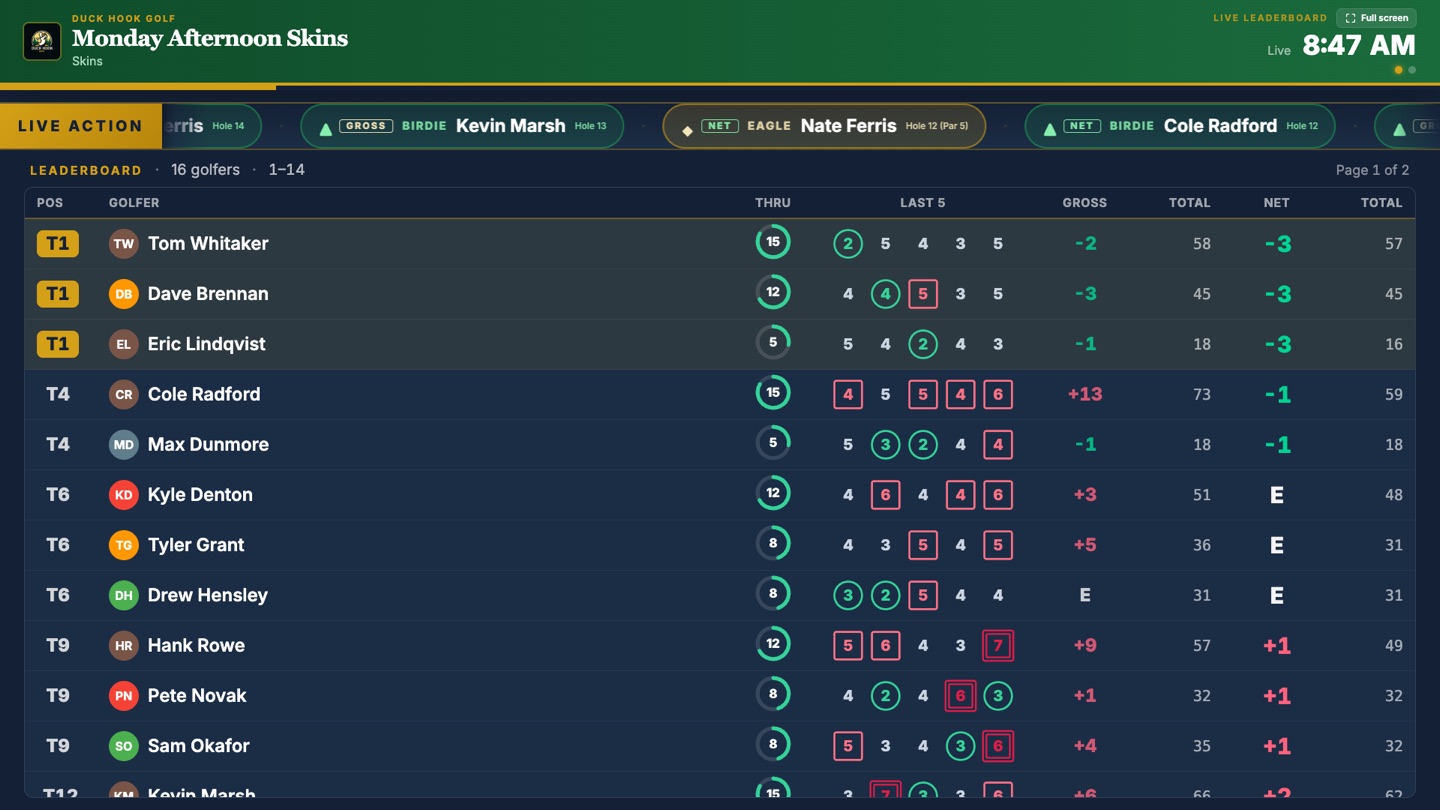
Open the TV view on any screen in the clubhouse, grill room, or sim bay. Pick the screens you want, and it moves through them on its own and updates as scores come in, so nobody has to touch it all day.
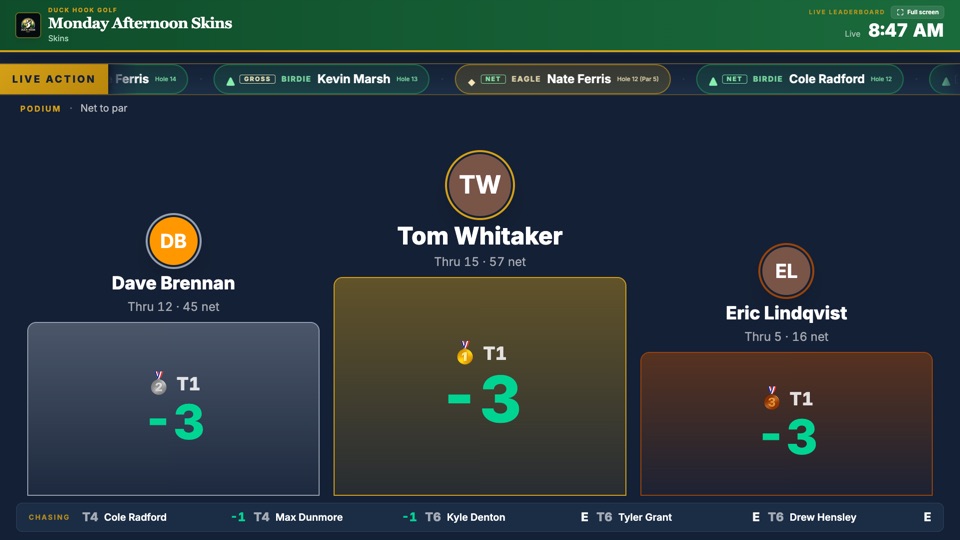
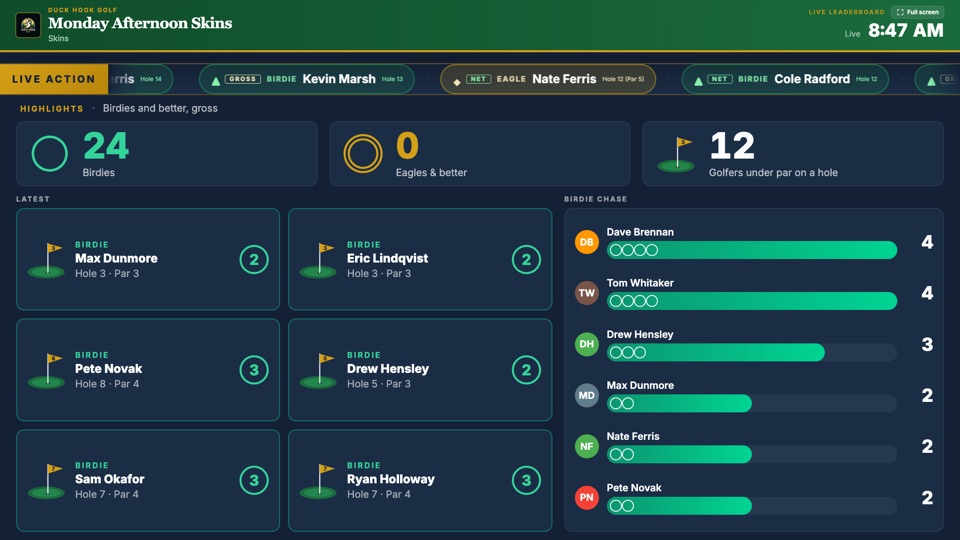
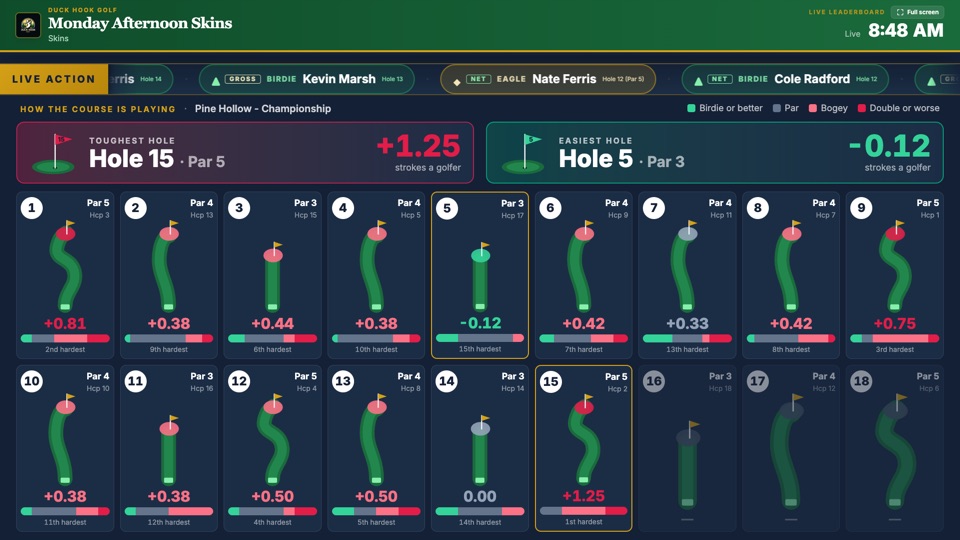
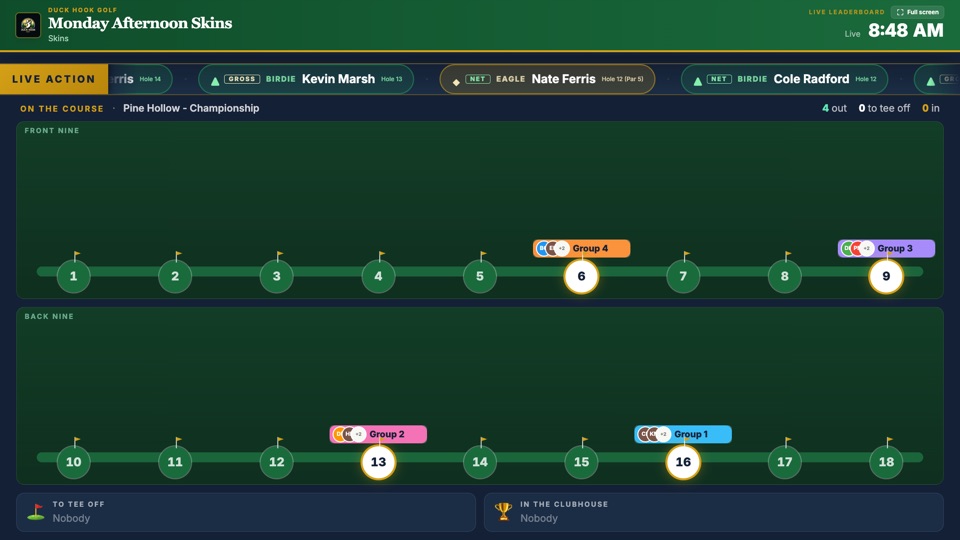
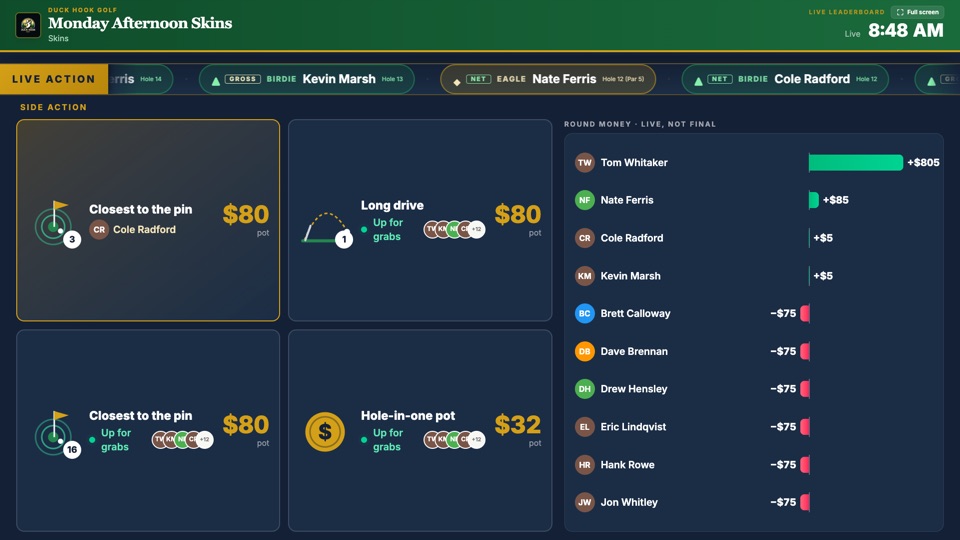
Also on the board: Game standings for your format, Scorecards for each course, the Scoring chart of how the leaders' rounds moved, Team leaderboard and Flight standings when the event has them, and Up next at the club with a QR code to sign up for what's coming.
Each time you start TV mode, choose which screens to show from a preview of each one, and how long each stays up: 10, 20, 30 or 45 seconds.
Every screen leads with a picture: scores circled and boxed like a card, rings for holes played, a flag for each hole. A big field gets more pages instead of smaller type.
Eagles, birdies, birdie streaks, and big moves scroll across the top of the screen as they happen, for both gross and net scores. Season standings and cup boards have their own TV view too.
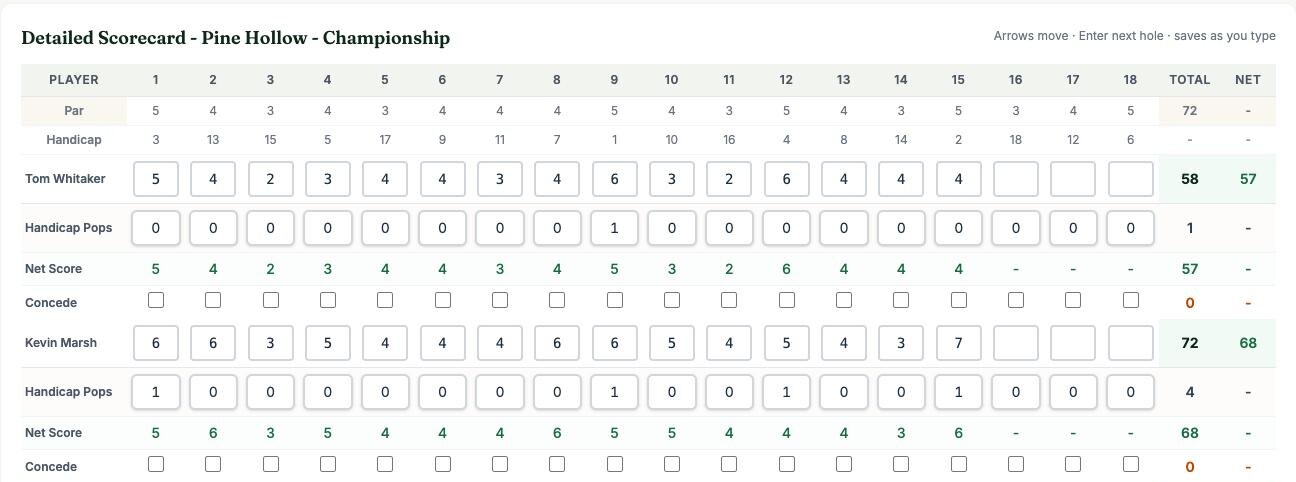
Not all golfers want to use the app — and that's fine. Duck Hook Pro's score entry is laid out like the scorecard in your hand. Type a score and it moves on by itself: along to the next hole, or down to the next golfer if you'd rather enter the card one hole at a time. Arrow keys move anywhere, and every box saves as you type. No Save button, no page reloads.
Scores are marked as you type them — circled under par, boxed over — so a wrong number stands out before you move on. Turn on Pops and net by hole to check each golfer's strokes as you go.
Each hole shows its own status, so you can see which box saved and which one didn't. If the connection drops, the score stays on the page and is sent again when the signal comes back.
On a phone, enter one hole at a time. Walking off a green with four cards in hand? The phone view shows one hole with the whole group on it, so you can punch in four scores and move on.
You can also change any player's handicap and pops from the same screen. Net scores update right away.
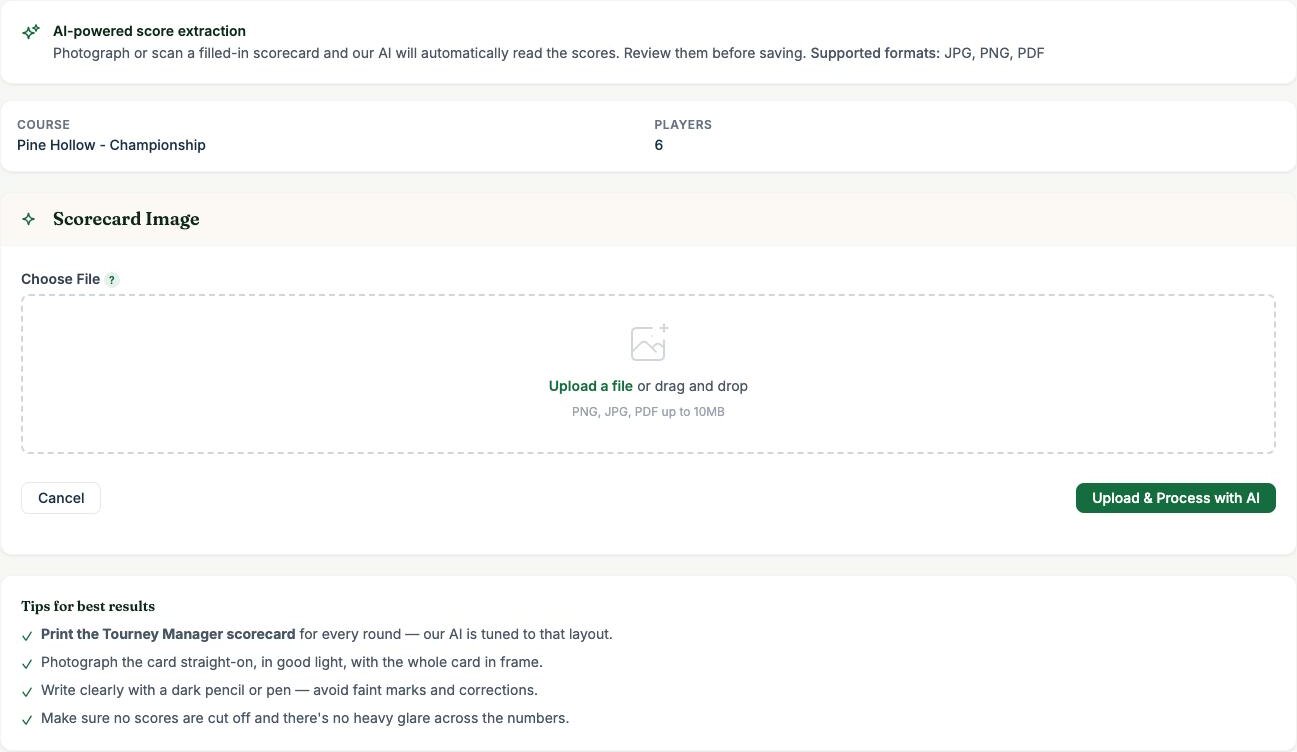
Upload a photo or scan of any paper scorecard — JPG, PNG, or PDF — and our AI extracts every score automatically. No templates to configure, no alignment tricks. Just point and shoot.
The AI focuses on what matters: the actual score written in each box. Circles around birdies, squares around bogeys, cross-outs, scribbles — none of that throws it off. Messy handwriting is fine. The numbers are all it needs.
You check it before it saves. Every scan opens a review screen so you can fix any misread before the scores go in. You get a notification when a scan is ready.
For the most accurate results, print the Duck Hook Pro scorecard before the round. With player names already matched to columns, the AI can assign every score to the right golfer without any guesswork.
A weekly net league, a two-person scramble, a Ryder Cup, a member/guest — every kind of event is a ready-made starting point that fills in the whole setup. Or run last season's event again in one tap. Change anything you like.
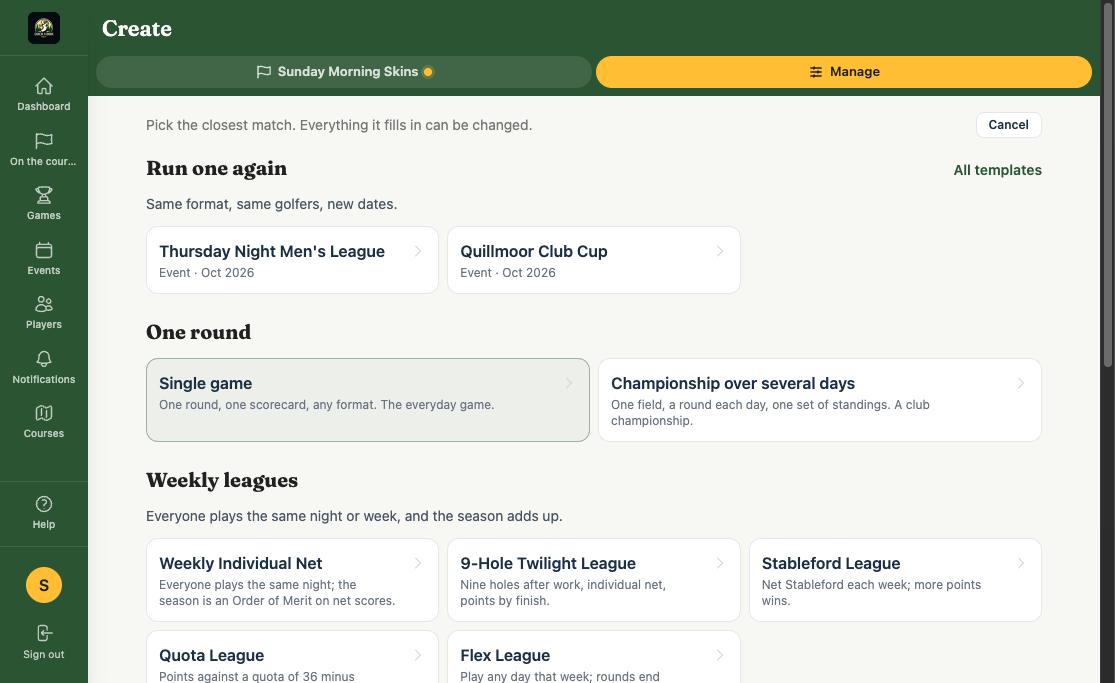
Last season's league or a saved template, with new dates and the same golfers. The quickest setup there is, so it comes first.
Weekly net, nine-hole twilight, Stableford, Quota or a flex league that plays any day of the week. Every round of the season is built from your nights and dates.
Two-person best ball or scramble, or teams of three counting the best two balls. Build the teams once and they're carried into every round.
Teams play each other in matches worth points: a round-robin league with a bracket at the end, a two-man points league, or a Ryder Cup.
Flighted member/guest four-ball with a shotgun tee sheet (see how it works), a club championship over several days, or a single game in any of the 43 formats.
Name the event, build the teams, then build each session: four-ball, foursomes, scramble or singles, with its points per match. Duck Hook Pro makes every match its own game with the golfers already in it, and they see their match in the app.
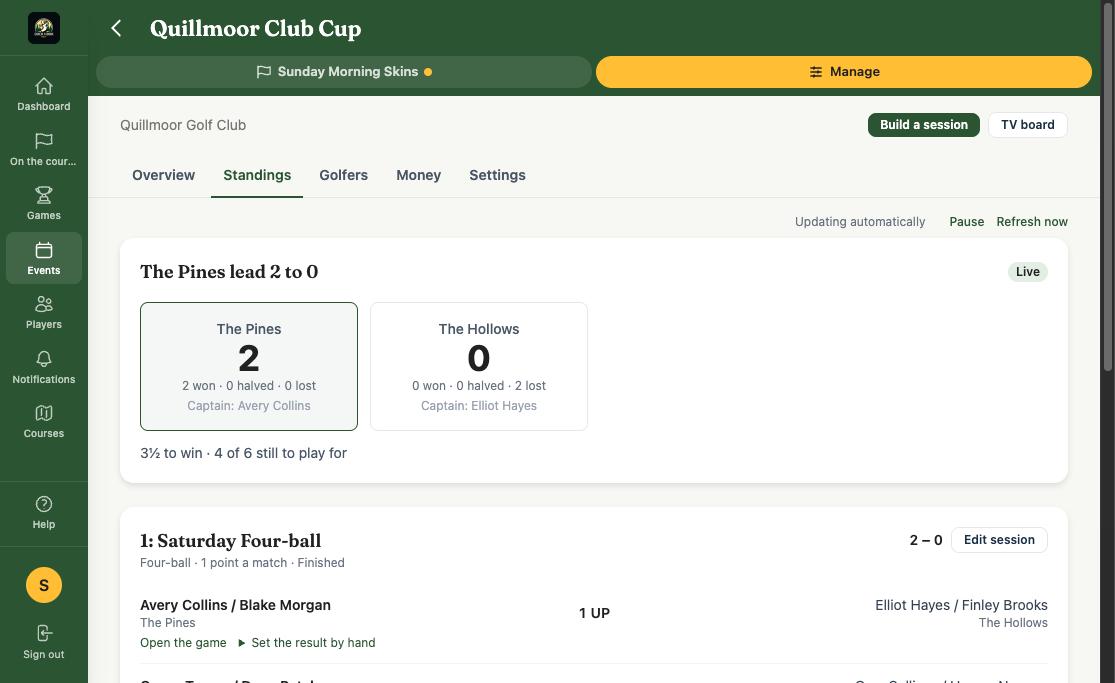
The cup board adds up the points as matches finish, shows who's up in the ones still being played, and says how many points win it. Put it on the clubhouse TV, or settle a conceded match by hand.
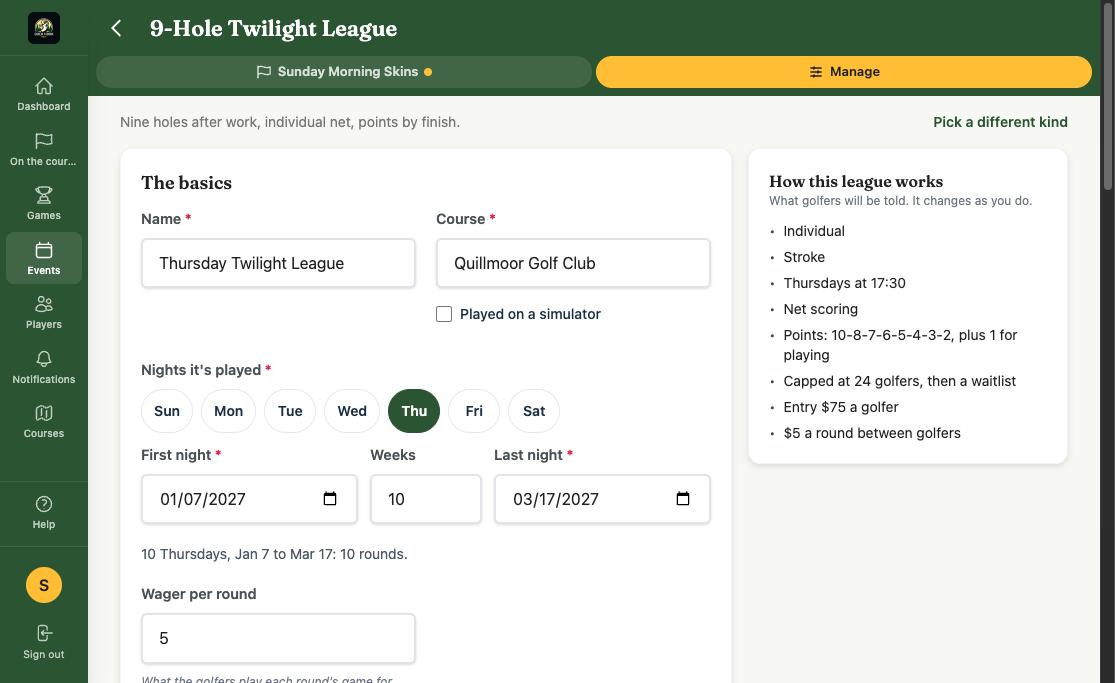
Only the basics up front. Name, course, the nights it's played, the first night and how many weeks. Duck Hook Pro works out the last night and tells you what it comes to — 10 Thursdays, Jan 7 to Mar 17: 10 rounds — so a wrong date is caught before the season is built.
See it the way your golfers will. How this league works rewrites itself as you go: the format, the points, the cap and waitlist, the entry fee.
Everything else is already filled in. Standings, handicaps, playoffs, sign-ups and prizes are folded away under More settings, and options that don't apply to your format stay out of sight. Change any of it later; a change reaches only the rounds nobody has started.
Every event opens on the round that's on now, or the next one, with its groups, score entry and TV board a tap away. Schedule, standings, golfers, money and settings sit in one row of tabs across every screen of the event.
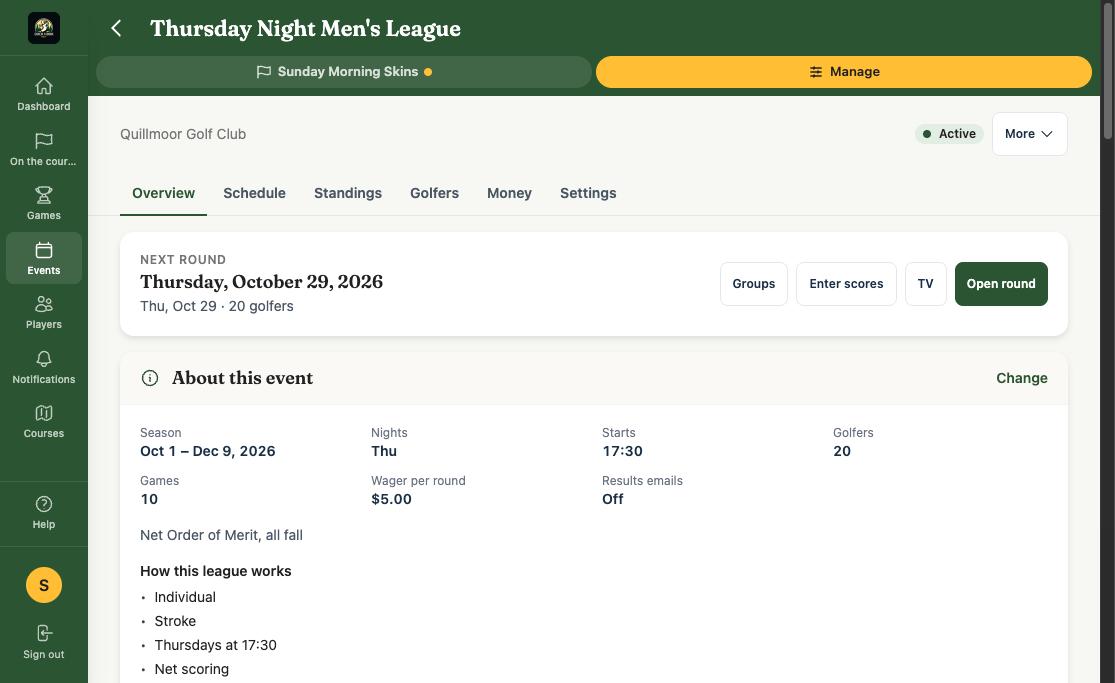
The next round and its golfers, with Groups, Enter scores, TV and Open round, then the event in plain English. A new event shows a short Finish setting up checklist — golfers, teams, sessions, groups — that ticks itself off and goes away.
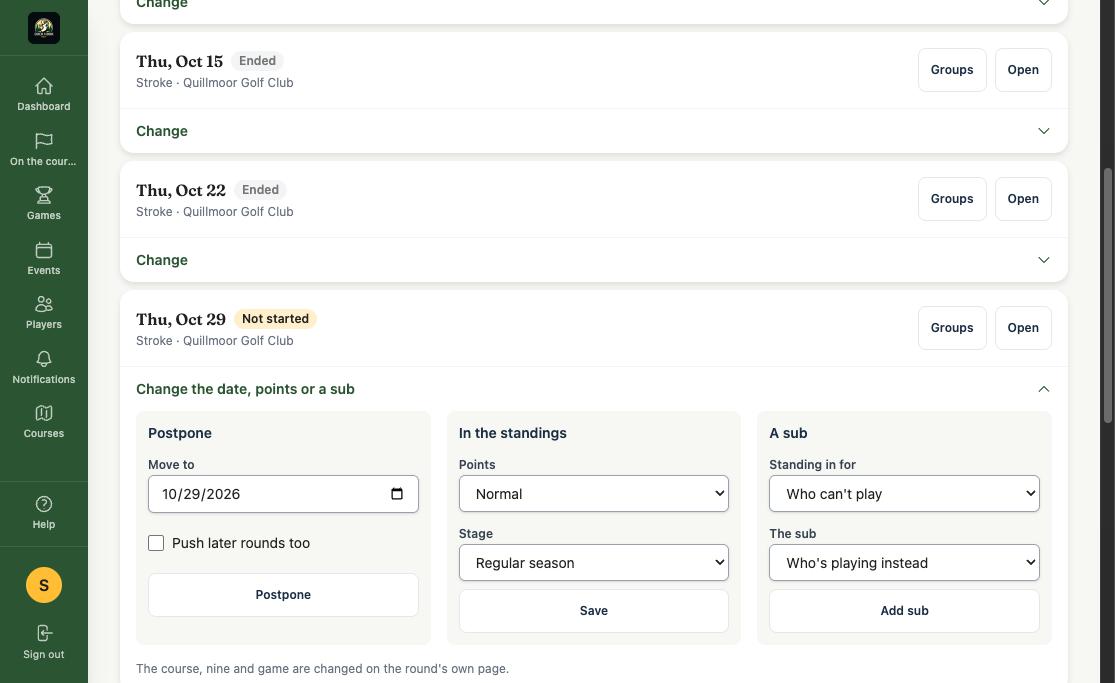
One row a round. Postpone a rained-out week and push the rest of the season back, make a week a double-points Major or the final, or add a sub for the night. Put the field into groups of three or four in one tap, so one phone scores each group.
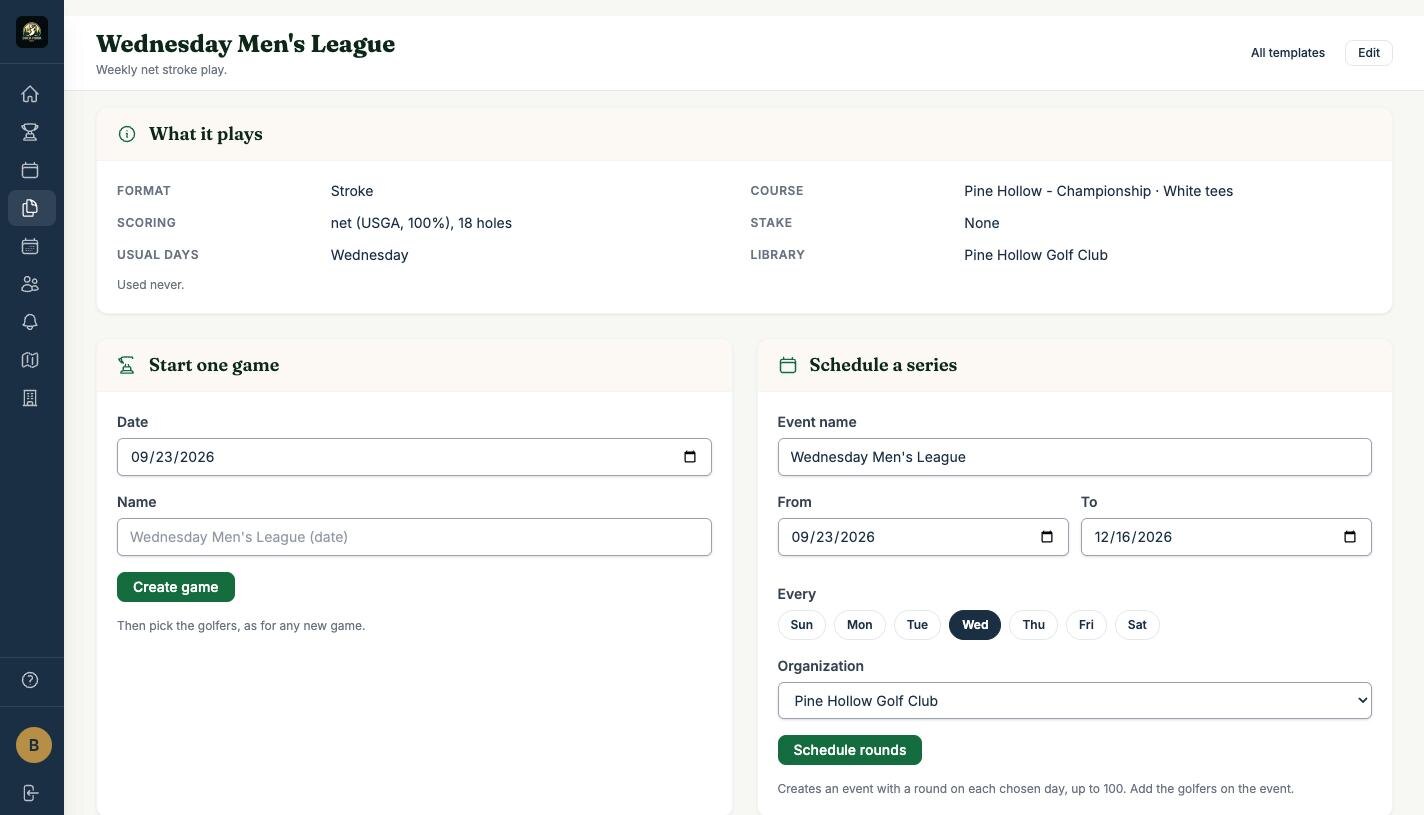
Save any game or event as a template. Format, course, tees, handicap settings, and holes are all saved. Your staff share the same template library.
Schedule a whole series in one step. Pick the weekdays and a date range, and every round is created with the right settings. Next season, Run it again copies last year's event with new dates and the same roster.
Run it again. Every finished game has a Run it again button that sets up next week's game with the same settings and field, and a new game starts with your last three games and your templates one tap away.
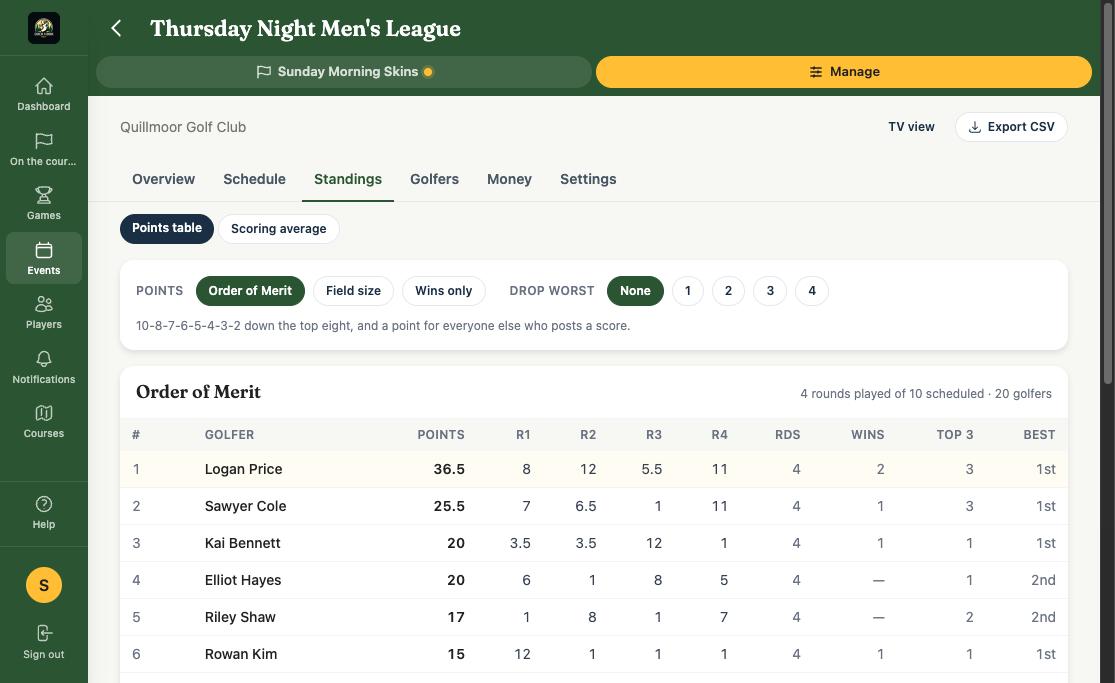
Stop adding up eight weeks of results by hand. Every event gets a season points race and a scoring average table, built from the scores already in Duck Hook Pro — and you decide exactly how the season is scored.
Choose how points are awarded: a classic 10-8-7 scale, F1 points, your own table, points by field size so a win in a full field counts more, or wins only. Add bonus points for the night's low net and low gross, break ties on countback, drop each golfer's worst rounds or count only the best eight, and make a Major count double. Put it on the clubhouse TV, or export it to CSV.
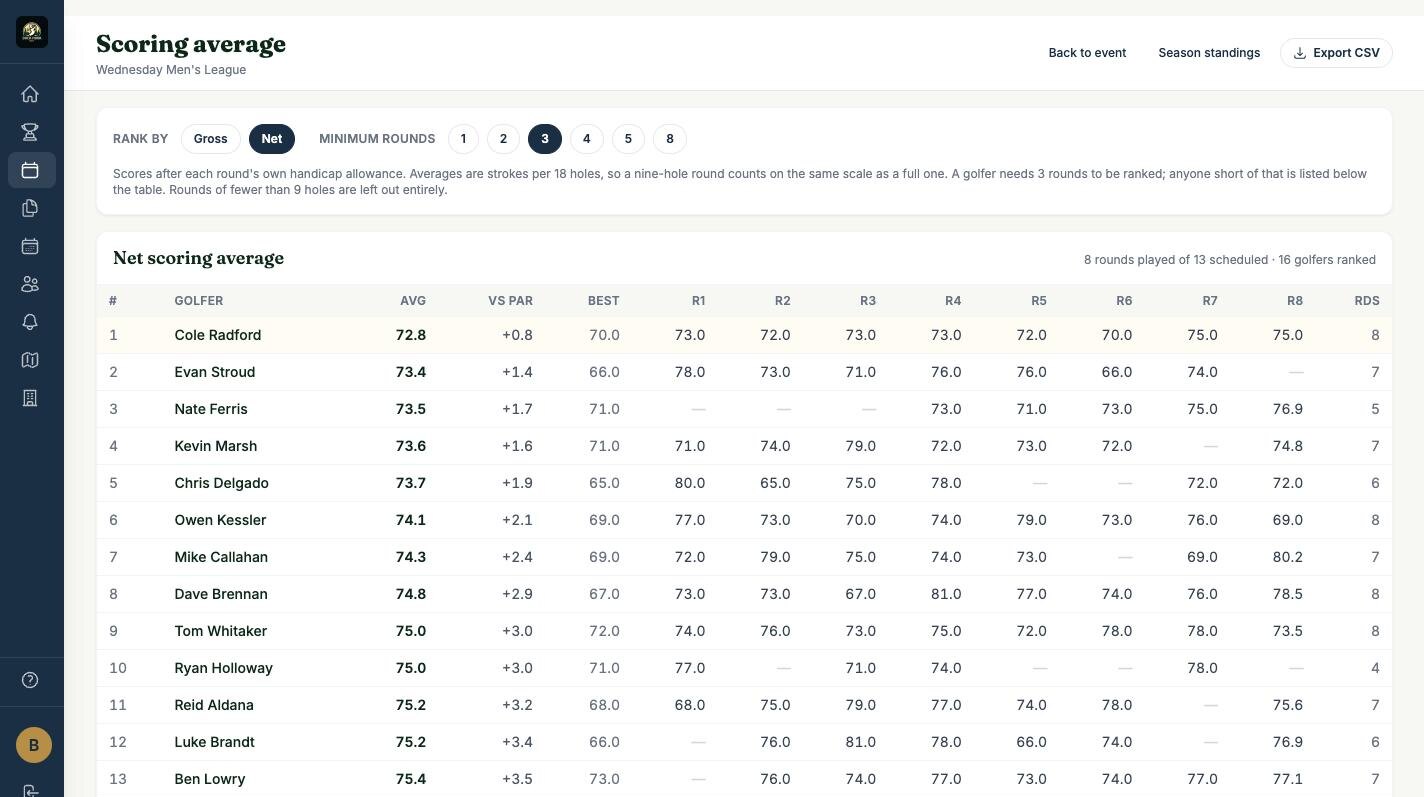
Who's actually playing the best golf? Rank the field by gross or net average, and set a minimum number of rounds so someone who played once can't top the table. Nine-hole rounds count on the same 18-hole scale. Run a "best net over the season" league on it outright, keep gross and net tables side by side, or split the field into A and B flights or men's and women's divisions, each with its own table.
Weekly sim leagues and outdoor leagues alike: pick a starting point, change what you like, and Duck Hook Pro runs the season.
Pairs, threes or fours that play together all season. Count every golfer's score, the best score on the team, or the best one, two or three balls on each hole — so a teams-of-three, two-best-balls league needs nothing special. Or draw new partners every week, at random or A players with B players.
Teams or golfers play each other week by week, with each match decided by holes won, the lower total, or points per hole plus points for the nines and the total. Set what a win and a halve are worth, then finish with a seeded bracket or a final round. Split the season into halves with their own winners.
Let golfers play any day that week, and have each round end itself the morning after its last day, so the week's results are final without you chasing them. Postpone a rained-out week and push the season back, add a sub for the night, and put each bay or foursome in its own group so one phone scores the group.
Play a handicapped scramble on 35% of the lower course handicap plus 15% of the higher, or 25% of the two combined, given by stroke index to the team. Men's and women's tees are handed out automatically.
Weekly net, nine-hole twilight, two-person best ball or scramble, teams of three, head-to-head match play, a points league, Quota, Stableford, a flex league or a Ryder Cup. Every preset fills the setup screen, and nothing is locked.
Every event writes out how it works in plain English — the points, the counting rounds, the playoffs, the entry fee — along with your house rules and prizes, on the sign-up page and the event page. Fewer questions at the front desk.
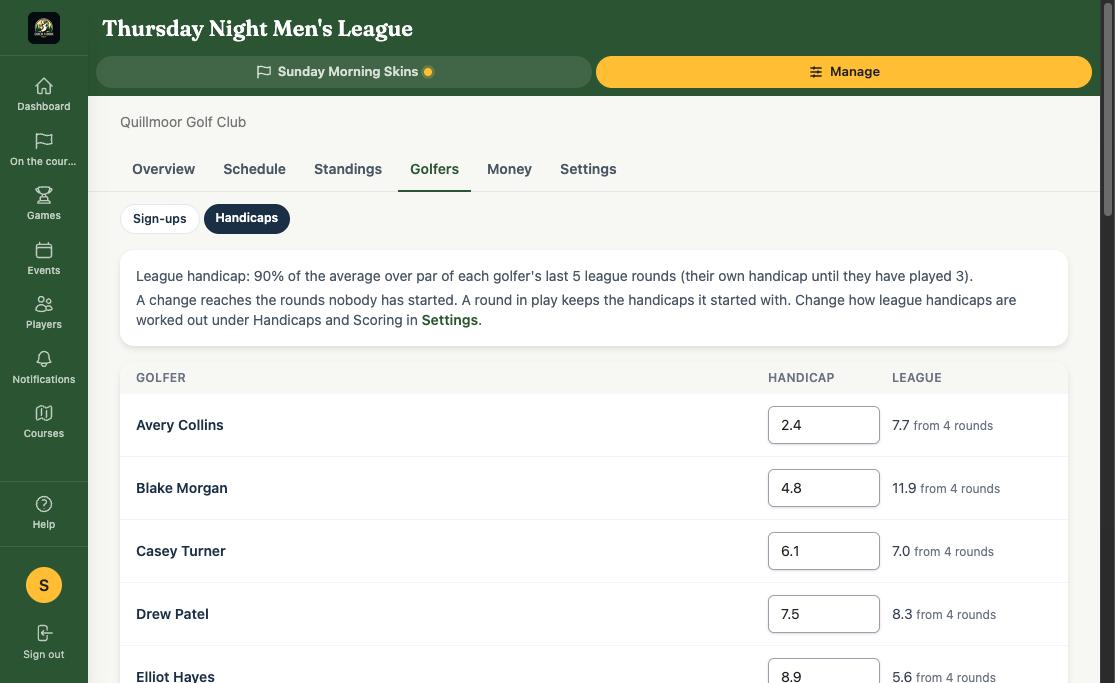
League handicaps and moving quotas. Play the season on each golfer's own handicap, or on a league handicap from their last rounds in the event — 90% of the average over par, say, until they've played three. Quota leagues can move each golfer's quota with their results. Every number updates when a round ends.
Every golfer's handicaps on one screen, with a roster import that reads TrackMan and Golfzon columns and doubles nine-hole sim handicaps for you.
Net double bogey, double par or a number of your own, applied to every game in the round. The card keeps what was typed; one blow-up hole just stops counting against the season.
Decide once what a missing partner counts for: nothing that night, a blind draw from another team, par plus their strokes, or a set score. Or add a sub for the week.
Offer 5:30, 7:15 and 9:00 with a few places each. Golfers pick a wave when they sign up, a full wave takes a waitlist, and their wave becomes their tee time every week.
Standings and tonight's scores for anybody with the link — no sign-in and no app — refreshing every minute. Names and scores only, never money.
Pay the top places from a share of the entry fees, a set amount a place, or the top part of the field. Duck Hook Pro works out who gets what for the season and for each night.
Run the same league at a second location with every option copied, its own sign-ups and its own standings.
The flagship invitational is the hardest event of the year to run — registrations, pairings, flights, tee sheets, and a weekend of matches. Duck Hook Pro handles all of it, from the first sign-up to the final flight standings.
Every flight, every team and its combined handicap, plus a score-entry button for each flight and round and printable scorecards for every round.
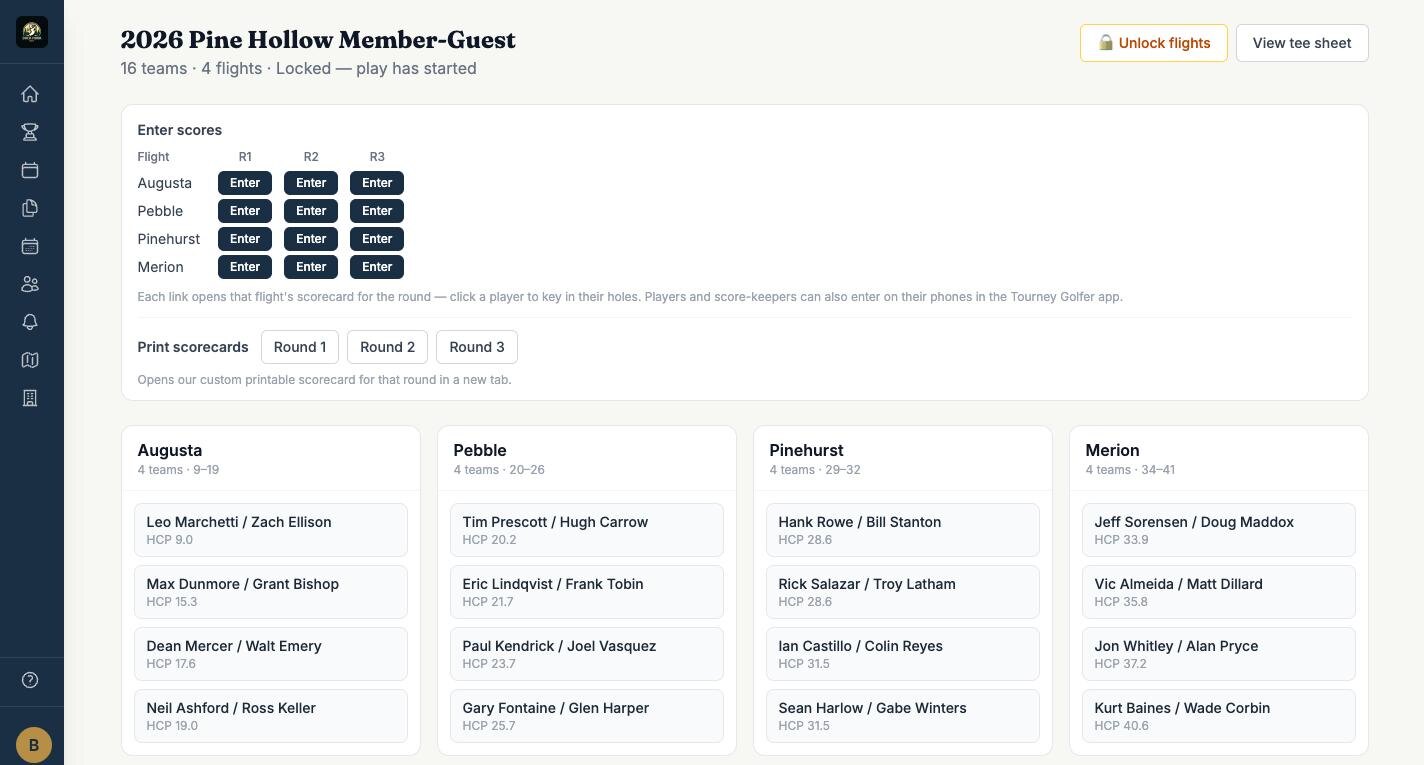
Teams are seeded within each flight, and every team plays every other team once. Each match has its starting hole for the shotgun.
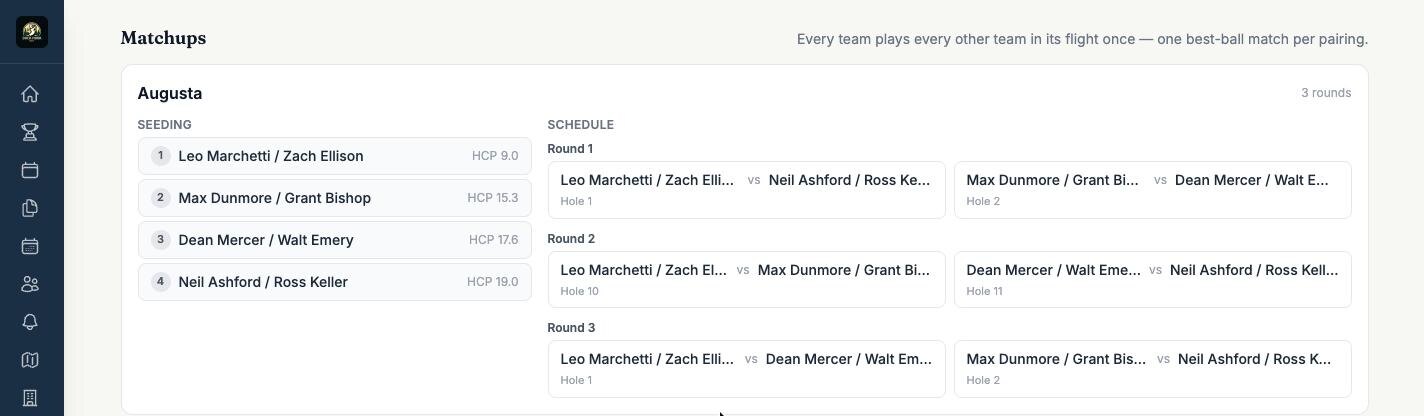
Pair every member with their guest in a fast pairing grid. Members can even register before they know who their guest is — fill the guest in later with one click.
Flights build themselves from combined team handicaps, balanced automatically. Then fine-tune on a drag-and-drop flights board — move teams, reorder seeds, add or rename flights.
Every team plays every other team in its flight in 9-hole four-ball matches. Win a hole for a point, halve it for a half — flight standings update live all weekend, in the app and on the clubhouse TV.
Generate the full shotgun tee sheet for the entire weekend in one click — waves, starting holes, and matchups laid out in a clean grid.
When the field is set, lock the event: teams, flights, and the tee sheet freeze so nothing shifts once scores start coming in. Unlock anytime if plans change.
Set a handicap cap for the event and capture every guest's GHIN number at registration. GHIN indexes are pulled the moment a player is added or updated, then re-synced automatically every night, so the field is always current.
Every event gets a public sign-up page — no login, no app required. It works for member/guest invitationals, weekly leagues, and one-day tournaments alike. Cap the field, take a waitlist, and keep track of who has paid.
Copy your event's registration link and drop it in an email, text thread, or club newsletter. Golfers add themselves straight to the roster — members register their guest at the same time.
Every event comes with a print-ready QR sign for the pro shop counter or first tee. Golfers scan, register, and they're in — no clipboard, no transcribing names.
Set a registration deadline and sign-ups close automatically. Cap the field by golfers or teams; once it's full, golfers join a waitlist and move up when a place opens — or hold places in the order deposits are paid. Record entry fees, deposits and member or non-member prices as the venue collects them. Golfers new to Duck Hook get a welcome email with a link to the free app, so they arrive ready for live scoring.
Duck Hook Pro knows who plays at your course. These tools help you reach them.
Filter your roster with one click: played in the last 90 days, lapsed, never played, no app, no email, or no handicap. Each filter shows its count, and you can combine it with search.
Invite a segment to an event. Pick the golfers and an upcoming event, and each one gets an email with the sign-up link. Duck Hook Pro shows you who will be emailed and why anyone was skipped. Golfers who unsubscribed are never emailed, and a golfer is never invited to the same event twice.
Your course dashboard shows the golfers, rounds, average field size, repeat rate, and app adoption at your club, compared with last month.
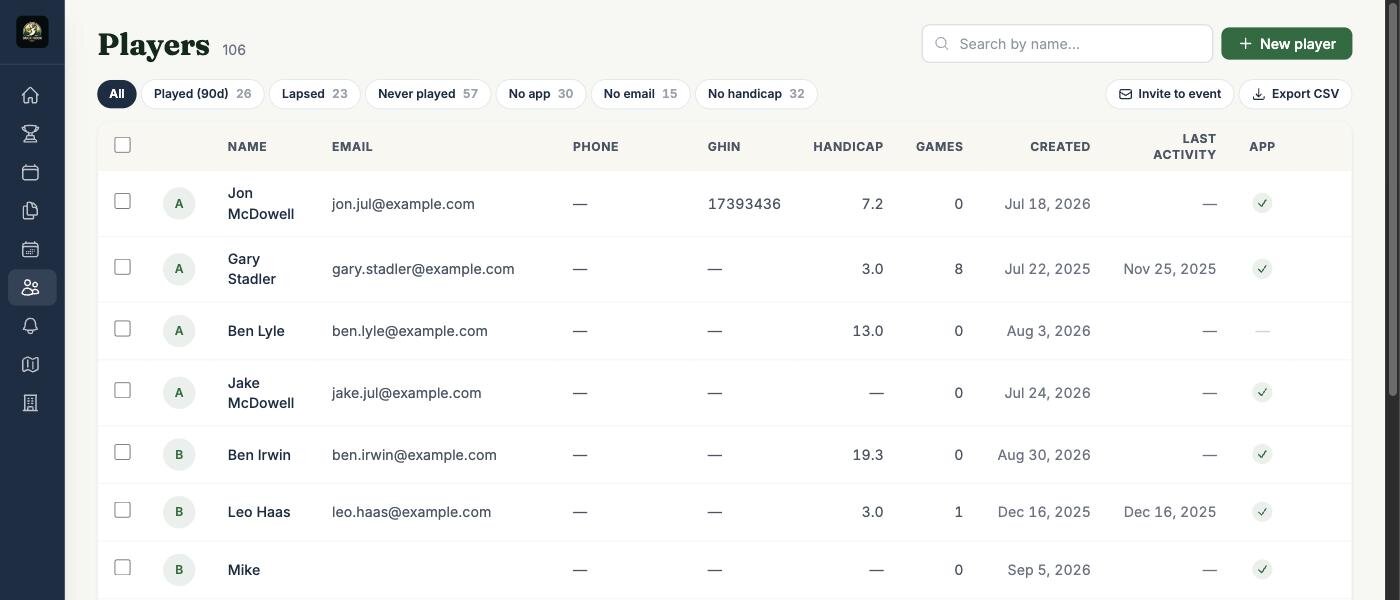
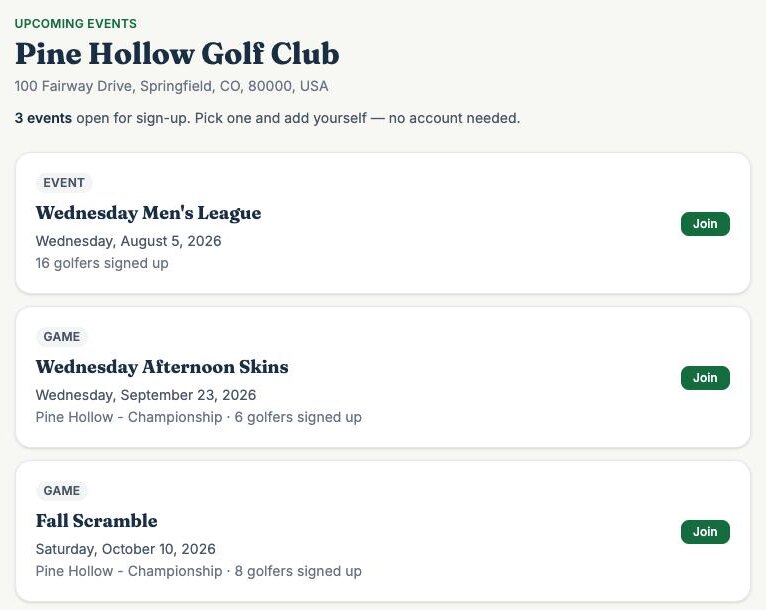
Every club gets a public event board listing its upcoming games and events, each with a sign-up button. Share the link, print the QR code, or paste one line of code into your club's website. The board updates itself when you add an event.
Send announcements to your golfers. Post news for golfers who have played at your club. They see it in the free Duck Hook Golf app, and you can email it to the same golfers with one click.
Multi-round, multi-format team competitions with custom point systems, team captains, and cumulative standings across multiple days.
See who's playing at your course, what they shot, who they played with, and what tournaments they're running. Real-time facility visibility.
Generate print-ready scorecards grouped by cart, foursome, or full field. Ready to print before the round starts.
Enter each player's USGA handicap index and Duck Hook Pro computes net deltas automatically: each player's strokes equal their handicap minus the field's lowest. The low handicapper never pops. Includes reset tools, single and double pops, per-hole stroke reassignment, and GHIN index sync for players with a GHIN number — fetched on player add or update, refreshed nightly.
Up to a dozen big-screen views for any game — leaderboard, podium, highlights, a course report, a map of where every group is, side action and more. Pick the ones you want, point a clubhouse or sim-bay TV at it, and it updates live as scores come in.
Run events spanning multiple courses with unified leaderboards and standings across the full field.
Invite golf pros and staff by email — they set their own password. Role-based access means each person sees only what they need, and you can add a co-manager to any game.
Bulk edit scores across players and courses. Fix mistakes fast — without hunting through individual scorecards.
Turn your groups into a shotgun start or tee times with 7–15 minute gaps, off the 1st tee or split between the 1st and 10th. Print it for the starter or export it to CSV.
Print final results or save them as a PDF, with team results first and overall standings for multi-day games. A settlement sheet shows each golfer's net for the round.
Get notified when a golfer signs up through your link or a scorecard scan finishes. If you miss something, a daily email sums up what's new.
See every game and event in a month view, filtered by course. On a phone, it switches to a simple list by date.
Paste a list of names or upload a CSV. Golfers you already have are matched, new golfers are created, and the whole field is added in one step. Export golfers, games, events, and scorecards to CSV anytime.
Before the round, Duck Hook Pro checks for missing tees, course data, handicaps, and team pairings, and links you straight to each fix. Your dashboard also shows anything that needs attention, like a game left open.
Manage one or more golf courses, staff, and course-specific settings from a single dashboard.
| Feature | Duck Hook Pro | Golf Genius |
|---|---|---|
| Price | Starting at $299/year | $1,000+/year |
| Free Player App | ✓ | ✓ |
| Recurring Leagues | ✓ | ✓ |
| Ryder Cup Events | ✓ | ✓ |
| AI Scorecard Reader | ✓ | ✓ |
| Member/Guest Events | ✓ | ✓ |
| Self-Registration Links & QR Codes | ✓ | ✓ |
| TV Leaderboards | ✓ | ✓ |
| Venmo Payouts | ✓ | — |
| Howard Vegas / Quota | ✓ | — |
| Side Games | ✓ | — |
| Mixed Formats Per League Round | ✓ | — |
| Golfer Insights Dashboard | ✓ | Limited |
| Simulator Support | ✓ | — |
Want the full breakdown? Read Duck Hook Golf vs. Golf Genius or Duck Hook Golf vs. Live Tourney.
Duck Hook Pro starts at $299/year, billed annually. Cancel anytime. This gives you access to every professional feature, including recurring leagues and event templates, season standings, tee sheets, member/guest events, AI scorecard reading, golfer segments and email invites, and organization management.
No. The Duck Hook Golf mobile app is completely free for all players. Only the tournament director or course operator needs a Duck Hook Pro subscription to access professional management features.
Any of them, started from the same screen: a single game in any format; a championship over several days, with standings that add up every round; a weekly league (individual net, nine-hole twilight, Stableford, Quota or a flex week); a team league with season pairs, threes or fours; a head-to-head league or a Ryder Cup-style cup, played in sessions of matches worth points; and a member/guest with flights, round-robin matches and a shotgun tee sheet. Each starts from a preset you can change, or from last season’s event. Read the member/guest guide.
Yes — member/guest invitationals are a first-class event type. Members register themselves and their guest through a public link or QR code, teams are auto-flighted by combined handicap (with a drag-and-drop board for final tweaks), round-robin four-ball matches are generated within each flight, and the full weekend shotgun tee sheet builds itself in one click. Flight standings update live in the app and on the clubhouse TV leaderboard. Read the full member/guest guide.
Every event has a public sign-up page keyed to a private link — no login or app required. Share the link, or print the ready-made QR sign for the pro shop counter, and golfers add themselves to the roster. You can set a deadline so registration closes automatically, and guests who sign up with an email get a welcome email pointing them to the free Duck Hook Golf app.
Yes. Save any game or event as a template, then start a single game from it or schedule a whole series by picking the weekdays and a date range. For an event you ran last year, Run it again copies it with next year’s dates and the same roster.
Yes. Every club gets a public event board that lists its upcoming games and events, each with a sign-up button. Share the link, print the QR code, or paste the embed code into your club’s website, and the board updates itself whenever you add an event.
Yes. Duck Hook Pro includes organization management that lets you manage one or more golf courses, staff, and course-specific settings from a single dashboard.
Duck Hook Pro offers everything most courses need — recurring leagues, Ryder Cup events, AI scorecard reading, and golfer insights — at roughly 1/5 the price. Plus exclusive features Golf Genius doesn't offer: Venmo payouts, unique game formats like Howard Vegas and Quota, side games, mixed formats per league round, and simulator support.
Enter each player’s handicap index and Duck Hook Pro gives strokes for you. Each game uses one of three methods: USGA, a full course handicap from the tee’s slope and rating; Relative (net deltas), where the lowest handicap in the field plays at scratch and everyone else gets the difference; or USGA-Relative, which levels USGA course handicaps to the field’s low player. Strokes fall on the hardest holes by stroke index, you can set a handicap allowance and cap, and you can move any player’s strokes to different holes.
Yes — contact us about a free 90-day trial for golf courses and PGA professionals. Email support@duckhook.golf to get started.
Join the golf pros and league organizers who are saving time and money with Duck Hook Pro.
 Duck Hook Golf